Beyond the Blueprint: How Landing Zones Decay (And How to Stop It)
There's a moment every cloud architect knows . You've just finished the deployment. Management Groups are clean. Naming conventions are perfect. The Hub-Spoke topology is exactly as the whiteboard promised. You lean back, and for one brief, beautiful moment — it all makes sense.
That moment is called Day 1.
Now fast-forward six months.
There are orphaned subscriptions with no owner and no cost centre tag. A developer opened RDP "just for an hour" during a production incident and never closed it. Your meticulously designed Enterprise-Scale environment has quietly turned into a digital junk drawer.
Welcome to Landing Zone Drift — the thing nobody warns you about in the CAF documentation.
The Uncomfortable Truth About Landing Zones
Here's what most teams get wrong: they treat a Landing Zone as a project with a start date and an end date. You deploy it, hand over the keys, and move on to the next thing.
But a Landing Zone isn't a project. It's a product. And like any product, if you stop maintaining it, it rots.
Drift Starts Small — But It Compounds
A manual change here. A quick portal click there. A policy exception that was supposed to be temporary. Each one feels harmless in isolation. Together, they quietly unravel everything you built.
The three main culprits of Landing Zone Drift:
-
ClickOps
Someone makes a change in the Azure portal during a 2am incident. It fixes the problem. It never gets committed to code. Six months later, nobody knows why that firewall rule exists or who put it there.
-
Expansion Fatigue
Creating your 5th subscription manually is fine. Your 50th is where copy-paste errors and forgotten governance steps start creeping in.
-
Policy Stagnation
Azure releases new services constantly. Your global policies, written 18 months ago, have no idea those services exist. Gaps appear silently.
The Fix, Part One: Stop Creating Subscriptions Manually
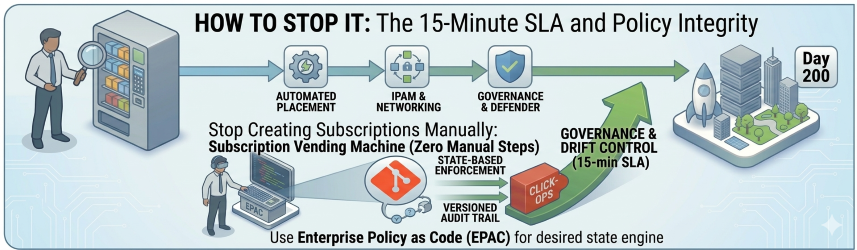
The single most impactful thing you can do is build a Subscription Vending Machine.
The name sounds fancier than the concept. It's simply a pipeline that treats a new Azure subscription like a product — something that gets built consistently, every time, with zero manual steps.
When a team needs a new environment, they raise a request (or trigger a workflow). The pipeline handles everything:
What the Vending Machine Delivers
- Placement — The subscription lands in the right Management Group automatically. Corp or Online, no guesswork.
- Networking — It peers to the Hub VNet and gets an IP range from your IPAM. No emails to the networking team. No waiting.
- Governance from day one — RBAC roles, budget alerts, and tagging policies are applied before anyone logs in.
- Security, already enrolled — Microsoft Defender for Cloud and Log Analytics are connected out of the box.
The 15-Minute Benchmark
If it takes more than 15 minutes to give a team a new, fully governed subscription, your process is the bottleneck — not the team. They'll work around it, and that's where drift begins.
flowchart LR
    REQ([Team Request]) --> PIPE([Vending Pipeline])
    PIPE --> MG([Management Group\nPlacement])
    PIPE --> NET([Networking\nIPAM + Hub Peer])
    PIPE --> GOV([Governance\nRBAC + Budgets + Tags])
    PIPE --> SEC([Security\nDefender + Log Analytics])
    MG & NET & GOV & SEC --> SUB([Governed Subscription\nReady in <15 min])
    style REQ  fill:#0078D4,color:#fff,stroke:#0078D4
    style PIPE fill:#005A9E,color:#fff,stroke:#005A9E
    style MG   fill:#004578,color:#fff,stroke:#004578
    style NET  fill:#004578,color:#fff,stroke:#004578
    style GOV  fill:#7719AA,color:#fff,stroke:#7719AA
    style SEC  fill:#7719AA,color:#fff,stroke:#7719AA
    style SUB  fill:#107C10,color:#fff,stroke:#107C10
The Fix, Part Two: Treat Your Policies Like Code
Standard Azure Policy is powerful. But managing 200+ policy definitions across 50 management groups through the portal is like editing a database by hand. Eventually, something breaks and you don't know why.
This is where Enterprise Policy as Code (EPAC) changes the game.
-
Versioned Governance
EPAC brings your governance into Git — which means everything that matters about your policy estate is versioned, reviewable, and auditable. Who changed it? When? Why? It's all there in the commit history.
-
Desired State Engine
EPAC is a desired state engine. If someone deletes a policy assignment in the portal — whether by accident or out of desperation — your CI/CD pipeline will detect the drift and put it back. The portal becomes a read-only view of what the code has already decided.
-
Multi-Tenant Support
For organisations managing multiple Azure tenants (think managed service providers or large enterprises with separate tenant boundaries), EPAC also lets you govern all of them from a single repository. One source of truth, regardless of how many tenants you're managing.
EPAC at a Glance
| Capability | Without EPAC | With EPAC |
|---|---|---|
| Policy tracking | Portal only | Git history |
| Drift detection | Manual audit | Automated CI/CD |
| Multi-tenant | Separate portals | Single repository |
| Audit trail | Limited | Full commit log |
The Mindset Shift That Changes Everything
Speed is a nice benefit of automation. But it's not the main point.
The main point is integrity.
The Core Principle
A clean environment on Day 1 is easy — anyone can do it once. A clean environment on Day 200, with 12 teams actively deploying into it, is hard. It requires a different way of thinking about the platform itself.
"The environment is the code."
If a change isn't tracked in your Vending Machine pipeline or your EPAC repository, it has no business existing in your cloud. Full stop.
It's a cultural shift as much as a technical one. But once it clicks — for you and for the teams you support — drift stops being something you clean up reactively and starts being something the platform prevents automatically.
Where to Start
If your Landing Zone is already showing signs of drift, you don't need to start over. Start here:
Your Drift Recovery Checklist
- Audit your policy assignments — find what's in the portal but not in code. That's your EPAC backlog.
- Pick your next subscription creation as a pilot — document every manual step, then automate it.
- Set a 15-minute SLA for subscription delivery. Work backwards from there.
The Goal
The goal isn't perfection. The goal is making drift visible — and then making it impossible.
flowchart TD
    D1([Day 1 — Clean Environment]) --> DRIFT{Drift Culprits}
    DRIFT -->|ClickOps| P1([Untracked Portal Changes])
    DRIFT -->|Expansion Fatigue| P2([Inconsistent Subscriptions])
    DRIFT -->|Policy Stagnation| P3([Governance Gaps])
    P1 & P2 & P3 --> CHAOS([Landing Zone Chaos])
    CHAOS --> FIX{The Fix}
    FIX -->|Part 1| VM([Subscription Vending Machine])
    FIX -->|Part 2| EPAC([Enterprise Policy as Code])
    VM & EPAC --> CLEAN([Day 200 — Still Clean])
    style D1    fill:#107C10,color:#fff,stroke:#107C10
    style DRIFT fill:#D83B01,color:#fff,stroke:#D83B01
    style P1    fill:#D83B01,color:#fff,stroke:#D83B01
    style P2    fill:#D83B01,color:#fff,stroke:#D83B01
    style P3    fill:#D83B01,color:#fff,stroke:#D83B01
    style CHAOS fill:#A4262C,color:#fff,stroke:#A4262C
    style FIX   fill:#0078D4,color:#fff,stroke:#0078D4
    style VM    fill:#005A9E,color:#fff,stroke:#005A9E
    style EPAC  fill:#005A9E,color:#fff,stroke:#005A9E
    style CLEAN fill:#107C10,color:#fff,stroke:#107C10
This is Part 3 of my ongoing series on the Microsoft Cloud Adoption Framework. Part 1 covered the CAF overview. Part 2 went deep on Azure Landing Zones design areas. Next up: Governance — Azure Policy as Code without killing developer agility.